 |
| Ken Parker and Parker Fly |
Ken Parker built his first archtop guitar in 1974. This was long before he rose to fame with his well known electric guitar; The Parker Fly.
 |
| Ken Parker |
In regard to the origin of the Parker Fly, Parker, in his own words states, "Larry Fishman and I met in 1984 and began a playful but productive design partnership.
 |
| Larry Fishman |
 |
| 1993 Parker Fly Guitar |
In doing so, Ken created a modern ultra-light guitar, and made use of some unusual materials. Official sales of the Parker Fly began around 1993.
 |
| 1992 Parker Fly |
 |
| Parker Fly - custom marbled colour |
The fretboard was also made of a composite material and the frets were made of stainless steel. The design process has given Parker Fly guitars the reputation of having the “fastest neck in the business”.
Due to their durability, these materials will pretty much last for the lifetime of the owner.
The electronics used in the instruments were very unique as well. The guitar used either coil split humbucking pickups or single coil pickups. Both had active circuitry. The Fly also had a piezo pickup for acoustic sounds.
 |
| Original Parker backside |
The structure of the neck was unique since it used multiple finger joints for stability.
 |
| Parker Vibrato |
 |
| Adjustment Wheel |
The tension is controlled by a balance wheel. (The guitars manual cautions not to set it too tight as this could cause the spring to break). The vibrato was engineered in a way to bring the strings back to pitch. Sperzel locking tuners aided in maintaining the instruments pitch and eliminated the need for string trees.
Ken Parker and Larry Fisher set up their business and manufacturing facility in Wilmington, Massachusetts.
 |
| 2002 Parker Fly Bass |
In 2003 Ken Parker sold his stake in the company to the U.S. Music Corporation.
 |
| 2003 Redesigned Parker Mojo Flame |
Creating the Parker Fly, Nightfly, and the Fly Bass was a labor of love. I had a lot of fun designing them and then devising and building the production tooling to make them. These instruments have worn well, and now the product line has been expanded by the new owners."
 |
| U.S. Music Corporation Home Page |
The U.S. Music Corporation is a distributor of multiple products, including Parker guitars. This organization manufactured the guitars from their Illinois based factory. They developed the line and changed up a few things.
 |
| 2003 Parker Fly Classic |
U.S. Music took a different approach to Parker Guitars. Some Parker guitars were no longer made with the original composite finish, but were now made of wooden bodies. To be fair, by 2001, Ken Parker had offered some models with wooden bodies.
Also some of the new models appeared to be Parker guitars that had morphed with other popular guitar designs.
For instance, the Single Cutaway Fly Mojo may have been a wonderful guitar, but the Les Paul influence is obvious.
 |
| Parker Single Cutawy Fly Mojo Flame |
Tuners were still made by Sperzel.
 |
| Fly Mojo Flame |
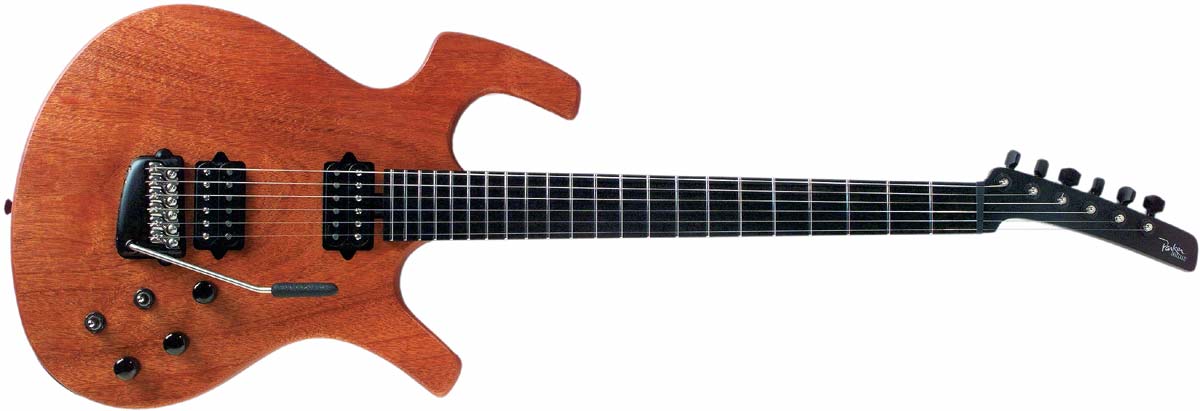
This guitar came with a mahogany neck topped with the Parker headstock and included one Duncan Jazz and one Duncan JB humbucking pickup. Once again the fretboard was ebony with no position markers.
The Fly Mojo Flame also had the Parker Fly vibrato, sans the adjustment wheel. U.S. Music eliminated the vibrato adjustment wheel on all models that they produced.
 |
| 2006 Fly Mojo |
The Fly Mojo was similar in all aspects of the previous guitar, but the body was made of natural unstained mahogany.
U.S. Music continued to build The Parker Fly guitar, but changes were made from the original design to correspond with their vision of this instrument.
 |
| 2005 Parker Fly Classic |
The U.S. Music Parker Fly came with two Seymour Duncan humbucking pickups and included the Parker vibrato. The guitar was available with three colour options.
 |
| 2005 Parker Fly Deluxe Ice Blue Burst |
The Fly Deluxe was a similar instrument that apparently was voiced differently than the original. It came in different six different colour schemes.
The Parker Nitefly Series included two guitars with features in the same shape as the original Parker Fly model. However these both had solid mahogany bodies and bolt on mahogany necks.
 |
| NiteFly Mojo Flame |
 |
| NiteFly Mojo |
The NiteFly Mojo guitar had the same accouterments however the pickups lacked the chrome covers and there was not a flame veneer topping the mahogany body. It was bare wood and available in a natural finish, a transparent cherry finish, or a dusky black finish.
 |
| Southern NiteFly |
What set this apart from a Telecaster was the Parker Fly body, and the Parker headstock. The chrome control plate featured a third knob for the piezo volume. Above it was a second toggle switch to activate the piezo pickup. It was available with blonde, butterscotch, or transparent red finish options.
There were other variants that U.S. Music came up with for their Parker guitars.
 |
| NiteFly M |
The Parker Nite Fly was one of the models designed by Ken Parker in the late 1990’s. The U.S. Music version of this guitar, called the NiteFly M, had a solid mahogany body and was topped with two humbucking pickups. The bolt-on neck was also made of mahogany. This instrument was offered with a natural oil and wax finish or a similar finish in black. It had the Parker vibrato.
 |
| NiteFly Alder |
 |
| NiteFly SA |
The NiteFly SA was based on the original Parker model. It had the typical Parker shape, but was topped with a white plastic pickguard that contained the electronics, including two single coil pickups and a humbucking pickup in the bridge position. A slider switch acted as a pickup selector. The guitars body was made of swamp ash and the neck was maple. It came complete with the Parker vibrato and was available in transparent red or blue.
 |
| Parker PM and Parker P Series |
U.S. Music Parker guitars included in its line up a series four solid body Parker Fly basses, in addition to their hollow-body PAB 40.
 |
| PB61SP |
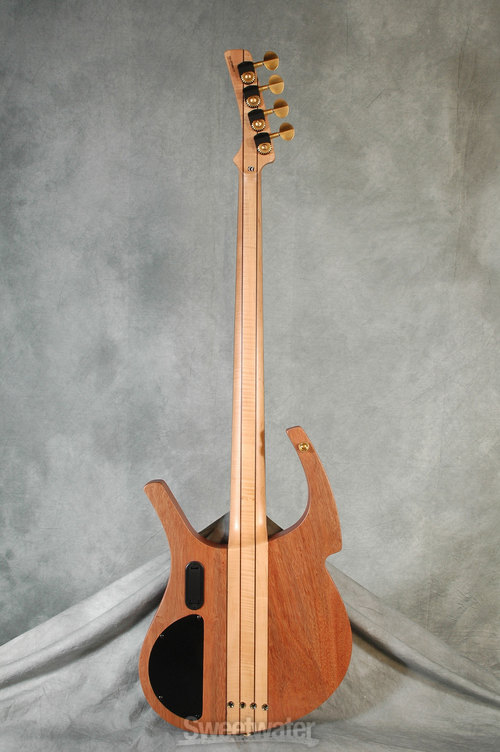
The PB61SP featured neck-thru construction of a spalted maple top and mahogany neck with an ebony fretboard and a spalted maple headstock veneer. The tuners and adjustable bridge/saddle were gold-plated. The body was in the Parker Fly Bass shape. This bass, like all Parker basses, featured twin EMG 35CS active bass pickups.
 |
| PB51TR |
The PB51TR (Transparent Red) was very similar, except the body and neck were made of mahogany and it was finished in transparent red. The tuners and adjustable tailpiece were in a black gun metal finish.
 |
| PB41 |
The PB41 series offered the same great features, such as EMG pickups, however the body was made of Sitka spruce with a Urethan finish, and the bolt-on the neck was maple. It was available in Silverburst, Black Matte, and Gold Matte. The hardware was also done in a black finish. These basses were available in four or five string models.
In 2006 the company added a line of acoustic-electric and jazz guitars under the Parker brand name. These were manufactured off-shore by Washburn guitars. At that time U.S, Music owned the US distribution rights to the Washburn brand as well.
 |
| Bronze Fly |
These acoustic models included the 24 fret Bronze Fly, which was a solid body guitar in the shape of the Parker Fly. It had no magnetic pickup, only a Fishman piezo pickup in the Parker style bridge, however there was no vibrato. Ken Parker had offered this guitar when he owned the company under the name The Fly Concert.
 |
| Nylon Fly |
The Nylon Fly was a similar guitar. This model came with the Fishman piezo placed under a handcrafted ebony bridge. Both models were topped with gold-plated Sperzel locking tuner. During the years Ken owned the company this guitar was called The Spanish Fly.
The PJ14N and PJ12 SB were true archtop hollow-body guitars. Both of these guitars had the most unusual body designs as well as unique f-holes.
 |
| PJ14N |
 |
| PJ12SB |
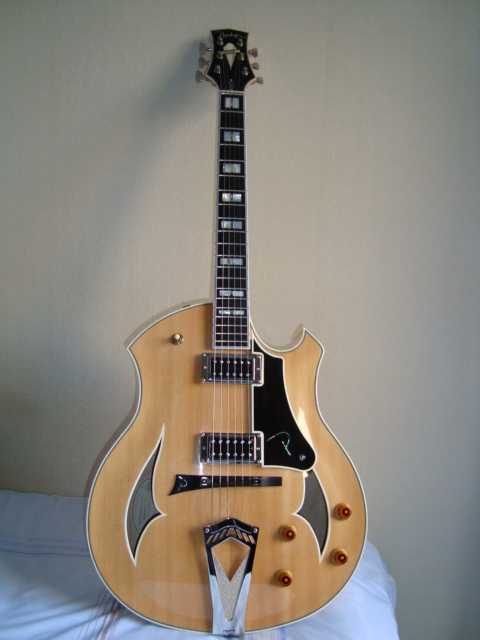
The PJ12 SB (sunburst) featured two Egnater Humbucker pickups mounted on the guitars body with individual volume and tone controls, a stunning brass tailpiece, and a 5-ply Rock Maple neck with Gold Grover Titan Tuners. This guitar featured a bound ebony fretboard with block position markers. The 3-on-a-side headstock had a large split-diamond inlay and above it the Parker logo all in mother-of-pearl. The PJ12 was the same guitar with a natural finish.
 |
| Parker Event Series |
 |
| Parker P8E |
The P8E guitar was designed with a solid cedar top, with a flamed maple back and sides. The unbound fretboard was made of ebony and had small dot inlaid position markers on the boards bass side The electronics were designed by Larry Fishman and included a piezo unit in the bridge and a Fishman magnetic pickup just under the neck. The master volume control is on the guitars top and on the upper side bout are the controls for treble, bass, and pickup balance.
 |
| Parker P9E |
The P9E was very similar, except for the choice of wood. For this guitar, the top was solid cedar, but the back and sides were made of Indian rosewood The neck was made of mahogany.
 |
| Parker P10E |
The P10E came with all the features of the P9E, however the neck had an ivoroid fretboard with dark dot position markers. The bridge was made of this same material.
 |
| Parker P6E Event Series |
This guitar had a solid Sitka spruce top with single ply binding. The accouterments were similar to th aforementioned mode, with biggest difference being the depth of the body.
The other difference was the necks which were made of 5-ply mahogany and maple. The body on the P6E models were made with mahogany back and sides. Once again the fretboard Is made of ebony with microdot inlays, The electronics were designed by Larry Fisher. These guitars were available in white, black, and transparent red.
 |
| Parker P7EQS |
The P7EQS had the same accouterments, but had a fancy quilted sapele top.
 |
| Parker Intrique Series acoustic |
The Parker Intrigue Series, were acoustic guitar, with no electronic features. The unique body shape on these instruments was much different as there is no cutaway section.
 |
| Parker Intrique Series acoustic |
Also it 2006 Parker also came out with a unique acoustic bass guitar to match up with their Event Series guitars.
 |
| Parker PAB 40 |
 |
| JAM Industries |
This company has acquired many smaller distribution companies and owns the distribution rights to quite a few well know brands including Digitech, Washburn, Marshall, Hagstrom, Randall, Oscar Schmidt, and Korg.
 |
| 2010 Parker Maxxfly |
Standardized pickup cavities were set up to aid in manufacturing. The frets were reduced from 24 to 22, and the body became slightly thicker and heavier.
In 2015 the JAM Corporation announced that Parker's US production had ceased and a search for a new off-shore facility was underway.
 |
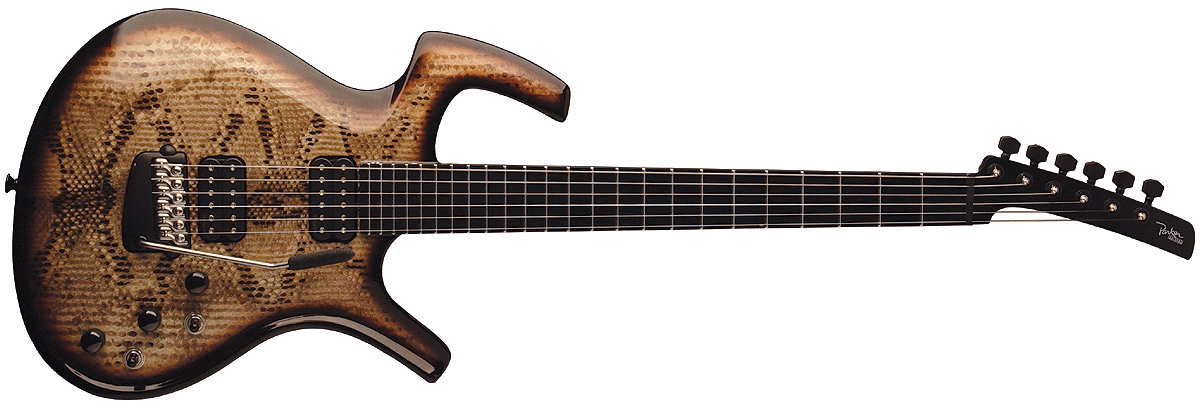
| Fly Mojo Snakeskin |
Parker did create several special edition models after the 2015 announcement including the Fly Mojo Snakeskin model, the Koa Fly Mojo model, and the Four Season Fly Mojo guitar, which was offered in differing finishes corresponding to the seasons.
 |
| Parker Guitars US Music page |
 |
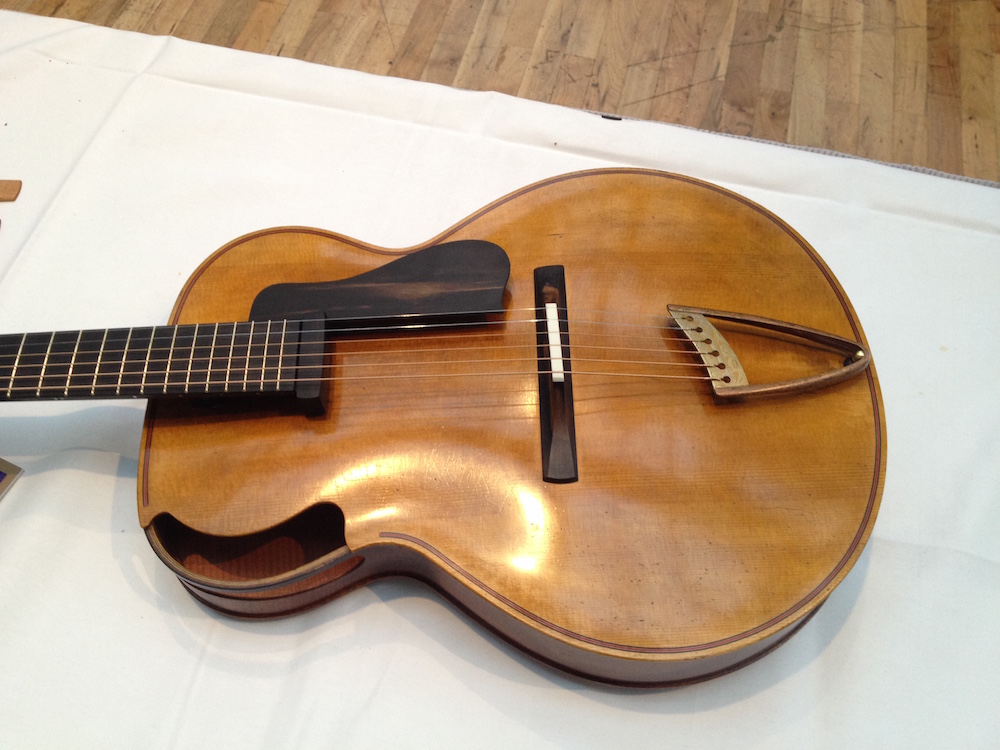
| Ken in 2013 Holding his archtop |
So what is Ken Parker doing these days? He has returned to his first love, which is building archtop guitars. He started doing this in the 1970’s, long before he became preoccupied with the Parker Fly guitar. During these years he was able to strike up a friendship and get advice from Jimmy D’Aquisto.
 |
| 1991 model much different Parker |
After selling his stake in Parker Fly Guitars in 2003, Ken began experimenting with the archtop guitar neck attachment. He felt that one of the pitfalls of the archtop acoustic was the bridge.
 |
| Parker Archtop "Grace" |
The bridges on his instruments need no adjusting.
 |
| Parker archtop neck and post |
This allows the player to not only adjust the neck, but to play in upper registers without being impeded by the instruments body or neck heel, as there is no neck heel. Another advantage to the removable neck is that the instrument can be dismantled and placed in travel size containers for safe travel on airlines. Parker can even build an instrument available with a variety of differing necks for the same body, such as a 25.5” scale or a 30” baritone scale, even six or seven string necks that would fit the same body.
 |
| Parker neck, bridge, fretboard |
Parker’s fretboard design involves an altered conical parabolic curve that is based on the players preference for string gauge and action. He suggests using 12 gauge string sets for his instrument, preferably made of phosphor bronze material, since he uses Fishman Rare Earth SA220 humbucking pickups on his instruments.
 |
| Fishman Rare Earth pickup top and side view |
 |
| Parker Archtop headstock & tuners |
Ken Parker archtop guitars have a base price of $30,000.
Click on the links under the pictures for the sources. Click on the links in the text for further information.
© UniqueGuitar Publications (text only)
.
















281 comments:
«Oldest ‹Older 201 – 281 of 281For Brother printer setup or error fixes, connect brother printer to laptop offers direct access to helpful resources. Users can search for their Brother printer model to download drivers or read connection guides. The site also helps with network changes and software updates. It is useful for users who prefer step-based help instead of guessing solutions. With proper guidance, the Brother printer is ready to use for daily printing, scanning, and office tasks.
The cricut explore air 2 download helps users get their machine ready for daily crafting. This Cricut Design Space software allows you to control cutting settings, upload images, and adjust designs before sending them to the machine. Cricut machines can cut a wide range of materials, including cardstock, clipboard, iron-on, leather, basswood, and vinyl. Once the app is installed, users can work on projects such as banners, stickers, decals, coasters, and more. A proper download ensures the Cricut machine responds correctly and gives clean, accurate cuts every time.
When an HP printer stops working as expected, how to reconnect hp printer to wi-fi is a helpful place to start. The website provides support for HP printer setup, error messages, and connection problems. Users can download printer drivers, read setup guides, and follow easy solutions. With clear instructions and model-based help, HP printer users can solve common printing problems without needing outside assistance.
Setting up a Cricut machine for the first time can feel overwhelming if you don’t know where to begin. Using Cricut.com/setup gives users a clear starting point to connect their machine, install the Cricut Design Space app, and prepare everything for crafting. The steps are easy to follow, which helps users avoid common setup mistakes. Once the basics are done, creating DIY projects becomes faster and more enjoyable.
What should you do after unboxing a Cricut machine? Visiting design.cricut.com/setup helps guide users through signing in to their Cricut account, connecting their device, and completing the setup process without any confusion. The platform walks you through installing Cricut Design Space and checking compatibility with your desktop or mobile phone. Instead of guessing the next step, users get clear direction, which makes it easier to move from setup to design without interruptions.
If you are setting up a Canon printer for the first time, then canon pixma printer bluetooth setup offers clear guidance for each step. The site helps users find the correct driver software, connect the printer to Wi-Fi, and complete the installation without confusion. It works well for both desktop and mobile users. By following the on-screen instructions, users can avoid common setup errors and begin printing documents, photos, and everyday files without connection issues.
Brother printer users rely on Brother 2270DW Wireless Printer Setup for official help with setup and printer-related problems. The site provides printer drivers, manuals, and troubleshooting steps based on Brother printer models. It helps users fix wireless issues, offline status, and printing errors. Whether the Brother printer is used at home or in an office, the guides are easy to follow. This platform helps users get their Brother printer working again without long delays.
Our premium textiles combine elegance, comfort, and durability to make your home truly inviting—discover the collection on TextileGallery
.https://textilegallery.n.bg/
New Cricut users often visit the Cricut.com/setup website to prepare their Cricut machine for the first DIY project. This webpage guides users through Cricut Design Space installation, Cricut machine connection, and account sign-in. The Design Space app works with desktops (Windows/Mac) and mobile devices (Android/iOS). After setup, users can start cutting paper, fabric, cardstock, balsa wood, leather, and other materials with clear guidance. Completing the setup helps avoid early issues and lets users enjoy crafting projects with better control and top-notch results from the beginning.
Brother printer users often visit brother printer set up when they need help with setup, drivers, or printer-related errors. The site offers model-based help so Brother printer users can find the right files and instructions without guessing. It covers wireless connection steps, basic fixes, and software updates. This support page is great for home and office users who want clear guidance. By following the steps shared on the site, Brother printers can return to normal use quickly.
The cricut app download allows users to design and send projects to their Cricut machine. This Cricut Design Space software works on multiple devices and helps users choose designs, edit text, and manage cuts. After installation, Cricut users can connect their cutting machine and start creating right away. It is useful for beginners and regular users who want easy access to craft tools. With the app installed, creating DIY projects feels more organized and less confusing.
The HP Envy 6455e WiFi setup helps users connect their HP Envy printer to a wireless network for daily printing. This process allows printing from laptops and mobile devices without cables. During setup, HP users enter WiFi details (network name and password) and follow guided steps. Once connected, the HP printer stays ready for tasks like documents, photos, and scanning. This HP printer setup works well for families and home offices that need easy wireless printing without repeated connection problems.
Starting a Cricut Explore Air 2 machine requires a proper cricut explore air 2 download on your operating system. This Design Space software allows users to design projects, upload pictures, and connect the cutting machine correctly. After installation, users can sign in to their Cricut account and begin cutting right away. The app works great for newbies who want guided steps and for regular users who create often. With the correct download in place, crafting becomes smoother and more enjoyable.
When why is my printer not printing stops responding or shows an error, support.hp.com is a reliable place to start. The website provides model-based support, including manuals, drivers, and troubleshooting steps. Users can search for their HP printer’s name to get accurate guidance without confusion. Apart from that, it also helps with network changes and system compatibility issues. By following the official instructions on this site, HP printer users can fix problems faster and return to printing documents without delays.
Many Cricut users visit cricut com to get started with their Cricut cutting machine. The site helps users sign in, connect their Cricut machine, and begin using design tools. It supports different Cricut machine models and works on computers (Windows and Mac) and mobile devices (Android and iOS). New Cricut users can follow simple steps to finish the setup process and begin crafting. Once ready, you can create labels, greeting cards, personalized mugs, tote bags, and custom items for home use or small projects.
When a Canon printer needs installation or reinstallation,how to connect a canon printer to my phone provides a clear starting point. The site helps users choose their Canon printer model, download the needed files, and complete wireless setup correctly. It works across different devices (computers and mobiles) and keeps instructions simple to follow. This process helps reduce errors during setup and saves time. Once finished, users can rely on their Canon printer for daily printing tasks at home or in a small office setting.
When your hp envy printer offline issue appears, printing tasks come to a stop. This guide explains why it happens and how to fix it using easy steps. From connection problems to HP printer driver errors, you will learn how to bring your HP Envy printer back online quickly. It helps restore smooth printing for home or office use and keeps your work moving without delays or repeated errors.
The cricut explore air 2 helps crafters understand Cricut machine setup, compatible materials, cutting settings, and daily use. It covers loading Cricut mats, choosing different tools, and fixing basic errors that stop craft projects mid-way. Whether you are new to Cricut or just need clear guidance, this guide explains things in simple steps. It makes crafting easier and helps you get better results without wasting material or time.
connect hp envy 6400 to wifi allows smooth wireless printing at home or work. This guide explains how to complete the setup process, fix network issues, and keep the HP printer connected. It helps HP printer users avoid common errors that stop printing jobs. With a proper connection, the HP Envy 6400 printer supports printing, scanning, and copying without interruption, which makes daily work simpler and more reliable.
An epson printer connect to computer delivers fine print results with smooth color balance and sharp text. You can print wirelessly and also use the scanning and copying features when needed. The ink system works for long use, and setup takes only a short time. Whether used for work papers, student notes, or creative projects, the printing stays clean and neat. It fits homes and small offices that want printing support throughout the week.
The hp envy 6455e driver helps your HP printer work properly with your computer and network. It supports printing, scanning, and basic controls without errors. A correct HP printer driver setup helps avoid paper issues, offline problems, and slow responses. This guide explains how to download, install, and update the HP printer driver software step by step for home and office use. With the right driver in place, your HP Envy 6455e printer is ready for daily work and printing needs.
If your hp envy printer not printing problem is stopping your work, this guide helps you fix it fast. It covers common causes like Wi-Fi errors, printer driver issues, low ink, and wrong printer settings. You will learn how to check connections, restart the HP Envy printer, and clear stuck print jobs. These steps help bring your HP Envy printer back to normal use for home, school, and office printing without trouble.
HP Envy wireless printer gives HP users a trusted place to fix printer issues and manage device setup. It offers help for HP printer driver downloads, Wi-Fi connection problems, error messages, and printer settings. HP printer users can follow clear steps to solve common problems without needing extra tools. This HP support page works well for home users and offices that depend on daily printing. With the right guidance, HP printers are ready for work and regular use.
Using cricut.com login gives you access to the Design Space software, saved projects, images, fonts, and Cricut machine settings in one place. It helps you manage your Cricut account and control all your creative work from any device. This guide explains how to sign in to your account, fix login problems, and keep your account running smoothly so your crafting work stays easy and organized every time you start a new Cricut project.
When users say “my epson printer is not printing,” the issue often comes from connection errors, printer driver problems, or system settings. This guide explains simple checks to fix printing problems and restore normal function. From checking cables to fixing wireless issues, the steps help users get their Epson printer working again. It supports smooth printing without repeated failed print jobs.
Setting up a Brother printer on a Mac computer is simple when you follow the right steps for how to install Brother printer on Mac. Users can download the correct driver software, connect the Brother printer, and finish setup easily. This process helps avoid common errors like missing software or connection issues. Once installed, printing will be easy and smooth for home, school, or office work. It supports daily tasks like documents, files, forms, and basic printing needs.
Learning how to connect canon printer to phone makes mobile printing easy for daily use. With the right setup steps, users can connect their Canon printer to an Android or an iPhone in a few minutes. It allows printing photos, files, and documents from the smartphone without cables. This Canon setup process works great for home users, students, and small businesses. It saves time and makes printing more flexible for everyday tasks.
cricut.com/setup helps new users bring their Cricut machine into use with clear and simple steps. It explains how to connect the device, install the Cricut Design Space software, and prepare the machine for the first projects. This guide works great for people who want to start crafting without Cricut setup delays. Once finished, Cricut users can enjoy smooth cutting, drawing, and design work for home crafts, gifts, and creative projects without repeated setup issues.
If your HP printer shows errors or needs a driver update, hp envy printer not printing offers trusted help. The website allows you to search by HP printer model and find the correct software downloads. It also provides troubleshooting steps for Wi-Fi problems, offline messages, and print quality issues. HP users can follow the guides at their own pace and fix common concerns at home. This official support page helps you keep your HP printer working without unnecessary stress.
Many craft lovers visit cricut.com/setup to activate their Cricut machine and install the required Design Space software. The site walks you through connecting your Cricut to your PC or smartphone. It also helps you check compatibility and finish the connection process smoothly. After the setup process, you can create stickers, greeting cards, earrings, tote bags, and personalized gifts. A correct installation gives you confidence and prepares your Cricut machine for regular creative work.
When setup hp envy 6055e stop working as expected, support.hp.com helps users find clear solutions. It provides guides for setup, driver software updates, connection fixes, and printing problems. HP printer users can learn how to check settings, fix errors, and keep devices running smoothly. This support system helps avoid delays in home tasks, school printing, and office work. With simple help steps, users gain better control over their HP printer use.
When you buy a new Cricut machine, cricut.com/setup helps you get started quickly. The page guides you through creating a Cricut account, downloading the Design Space app, and connecting your device. It explains each step clearly so you can avoid setup problems. Once your Cricut machine is ready, you can begin cutting vinyl, cardstock, paper, leather, or fabric for custom projects. This starting point makes it easy for beginners to move from unboxing to creating in a short time.
Looking for the right HP Envy 4520 printer ink? The HP Envy 4520 All-in-One Printer uses high-quality ink cartridges that deliver sharp text and vibrant color prints for home and office use. Whether you’re printing documents, photos, or school projects, choosing the correct HP Envy 4520 printer ink ensures smooth performance and long-lasting results. Always use compatible or original cartridges to maintain the best print quality and keep your printer running efficiently.
Learn how to easily connect hp deskjet 3755 to wifi in just a few simple steps. The HP DeskJet 3755 All-in-One Printer allows you to print wirelessly from your computer, smartphone, or tablet without using cables. By setting up WiFi on your printer, you can enjoy convenient printing, scanning, and copying from anywhere in your home or office. Follow the quick setup process to successfully connect HP DeskJet 3755 to WiFi and start wireless printing in minutes
The cricut explore air 2 software helps users control their cutting machine and complete DIY projects with better accuracy. This Cricut Design Space app lets users choose designs, adjust cut settings, and send projects to the crafting machine from their computer or mobile device. The Cricut Explore Air 2 cuts a variety of materials like paper, cardstock, felt, faux leather, HTV, and more. Once the software is installed, Cricut users can work on school projects, gifts, or small shop items.
Completing the how to set up hp envy 6055 helps your printer connect to the home network for wireless printing. Once connected, you can print documents, photos, and files from laptops, tablets, or phones without using cables. The HP Envy printer setup includes installing the driver software, selecting your WiFi network, and confirming the connection through the HP printer panel or app. After finishing these steps, the HP Envy printer works properly for daily tasks such as school assignments, office work, and photo printing.
Many crafters search for the Cricut Explore Air 2 download when setting up their cutting machine for the first time. Installing the correct Design Space app allows the Cricut Explore Air 2 to connect with your PC and begin cutting designs accurately. After the setup process, you can upload artwork, select materials, and send projects to the Cricut cutting machine. This makes it easier to create home decor, labels, custom gifts, and many other craft items. Proper installation helps the Cricut Explore Air 2 work smoothly for everyday creative projects.
If you want to start crafting on your computer, the cricut design space download for windows 10 helps you connect your Cricut machine with your PC. After installing the program, you can create and edit designs, upload images, and prepare projects for cutting. The Design Space software works with many Cricut models and supports various materials such as vinyl, paper, and cardstock. Once installed, Cricut users can easily organize projects and begin making stickers, wooden signs, greeting cards, or custom designs on their Windows device.
When an hp envy printer not printing issue appears, it can stop daily work and cause delays. The problem may occur due to low ink, connection errors, or outdated printer drivers. Checking the HP Envy printer status, restarting the device, and verifying the Wi-Fi connection often help fix the problem quickly. Updating the HP printer software can also restore normal printing. With the correct troubleshooting steps, most users can bring their HP Envy printer back to working condition and continue printing documents or photos without further trouble.
The ink for hp envy 4520 uses compatible ink cartridges that provide clear text and bright color prints for everyday printing. These cartridges are easy to install and help deliver smooth performance when printing documents, photos, and other materials. Using the right ink for the HP Envy 4520 helps maintain good print quality and reliable results for home or office use.
Many HP printer users rely on hp deskjet 2755e wifi setup when they face printing errors or setup confusion. The platform provides easy steps for installing HP printer drivers, connecting to Wi-Fi, and fixing printer issues. It also offers updates that help improve HP printer performance. Whether you are using Windows or Mac, the guides are simple to follow. This official support page helps keep your HP printer working properly for documents, photos, and everyday tasks.
cricut design space download for windows 11 helps users bring their Cricut machine into use step by step. The website shows how to create a Cricut account, install Design Space, and connect the device properly. It works well for beginners who want simple instructions. After setup, Cricut users can design and cut different materials for creative projects. A proper start helps avoid errors and keeps your Cricut machine ready for regular use.
If your HP printer needs setup or troubleshooting in connecting, how to connect hp deskjet 2755e to wifi gives clear help in one place. You can find printer drivers, setup guides, and steps to fix common problems like offline errors or slow printing. The site lets users search by HP printer model and get accurate instructions. It works well for home and office users who want quick solutions. With proper guidance, your HP printer can return to normal use and handle daily printing without issues.
When your hp deskjet 2755e wifi setup or needs setup help, support.hp.com gives clear guidance in one place. Users can search for their HP printer model and download the correct drivers or software. The official website also provides simple steps for fixing connection problems, offline messages, and printing issues. These instructions help both home and office users manage their HP printers easily. Visiting the official support page keeps your HP printer updated and ready for everyday printing tasks.
When setting up a new Cricut machine, cricut air 2 software provides the steps needed to begin quickly. The page guides users through creating a Cricut account, installing the Design Space app, and connecting the Cricut machine to a computer or phone. Once the setup is complete, you can start preparing craft projects such as custom cards, earrings, wooden signs, tumblers, tote bags, and more. Using the official setup page helps ensure the Cricut machine works correctly from the start.
If you just purchased a Cricut machine, cricut.com/setup helps you begin the installation process. The web page shows download cricut design space app, create an account, and connect your Cricut machine to a computer. These steps prepare the Cricut machine for cutting and crafting projects. Once the setup is complete, Cricut users can start designing paper flowers, tote bags, mugs, bookmarks, wooden signs, and more. The official setup page helps beginners get their Cricut machine ready for creative work.
If you are installing a Canon printer for the first time, ij.start.canon offers a simple way to begin. The site allows users to choose their Canon printer model and download the needed driver software. It also explains how to connect my phone to my canon printer. With clear instructions, Canon printer users can complete the setup without confusion. Starting from the official page helps ensure your Canon printer works properly from the start.
Starting your Cricut machine is simple when you use Cricut.com/setup for guidance. The page explains how to install the Design Space software, connect your device, and prepare it for your first DIY project. It helps new Cricut users complete the setup without confusion. Once everything is ready, you can start creating craft projects like custom cards, paper flowers, tumblers, decals, banners, and more. This setup process makes it easier to begin crafting with confidence.
When installing a Canon printer, Canon Bluetooth printer guides users through the setup process. The website helps you download the correct driver and connect the Canon printer to a wireless or wired network. It also provides instructions for completing installation on a computer or mobile device. Following these steps reduces the chance of setup errors. After finishing the process, your Canon printer is ready for printing documents, photos, and daily tasks.
Many new users rely on cricut.com/setup to prepare their Cricut machine for the first project. The website explains how to download the required Design Space software and link the Cricut machine to your operating system (computer or phone). It also guides you through Cricut download setup and connection checks. Following these steps helps avoid setup errors. After installation, you can begin working on craft ideas such as decals, greeting cards, tumblers, stencils, and custom gifts with your Cricut machine.
Cricut Explore Air 2 download allows you to install the free Cricut Design Space software needed to run your machine. Simply download, install, and connect your device to start cutting vinyl, paper, cardstock, stickers, and more. With quick setup and easy tools, you can begin creating DIY projects in minutes.
Many Canon users visit ij.start.canon to complete their Canon printer installation quickly. The website provides Canon printer drivers, setup steps, and troubleshooting help in one place. It guides you through connecting the Canon printer to your Wi-Fi network or USB cable and preparing it for use. These instructions help avoid common configuration problems. By following the official setup page, users can ensure their Canon printer performs well for everyday printing needs.
Setting up a canon pixma printer bluetooth becomes easier with guidance from ij.start.canon. The page helps Canon printer users download the correct drivers and software required for installation. It also provides simple instructions for connecting the Canon printer to a wireless network and completing the setup process. These steps ensure the Canon printer communicates properly with your computer or mobile device. Starting the installation process from the official Canon setup page helps avoid configuration problems and prepares the Canon printer for daily printing tasks.
New Cricut users can visit cricut.com/setup to prepare their Cricut machine before starting a DIY project. The page explains how to Download Cricut Design Space and connect the Cricut machine to your computer or smartphone. It also guides you through creating an account and confirming that the Cricut machine works properly. Completing this setup ensures your Cricut machine is ready for cutting materials. Once everything is installed, you can start making creative items such as greeting cards, earrings, gift tags, wooden signs, and decorative crafts.
When an HP printer needs setup help or shows an error message, HP ENVY Printer provides helpful guidance. The website allows users to search for their HP printer model and download the correct drivers and software on their computer. Apart from that, it includes guides for fixing an offline problem, connection issues, and printing errors. Clear instructions make the process simple for both new and experienced HP printer users. By using the official HP support page, you can keep your HP printer working properly and avoid interruptions during everyday printing tasks.
Setting up a Cricut cutting machine becomes easier with guidance from cricut.com/setup. The page walks users through installing the cricut design space software and connecting the crafting machine to their system. Moreover, it provides steps to confirm the Cricut machine works correctly before starting a DIY project. These simple instructions help Cricut beginners get started easily. After finishing the setup, the Cricut machine is ready to cut materials for creative projects and personalized craft designs.
connect epson printer to computer come with helpful features like Wi-Fi printing, mobile app support, and fast print speeds. They offer strong color output for photos and crisp detail for office documents. Scanning and copying help with extra tasks without needing another machine. Setup takes only a short time, and the controls are simple. This printer suits families, students, and small business owners who print often and want reliable print quality.
If your HP printer stops responding or prints incorrectly, setup hp deskjet 2755e is a helpful starting point. The platform provides tools for installing required drivers, updating HP printer software, and solving everyday printing problems. Users can also read troubleshooting articles designed for different HP printer models. This makes it easier to understand what might be causing the issue. Using the official HP support page helps restore HP printer performance so you can continue printing documents and images without unnecessary delays.
When an HP printer needs help with installation or troubleshooting, many users start at support.hp.com. The page provides driver downloads, manuals, and guides for different HP printer models. Moreover, it explains how to fix common issues like connection problems or HP printers showing an offline status. Clear instructions help users complete the HP printer setup without confusion. By visiting the hp envy printer 4520 ink, you can keep your HP printer updated and working properly for everyday printing tasks at home or in the office.
Learn how to setup cricut explore air 2 with this easy step-by-step guide for beginners. Discover how to set up your machine, connect it to your computer or phone, and start creating beautiful DIY projects like stickers, cards, vinyl decals, and more. This complete guide will help you understand the basics of Cricut Design Space, choose the right materials, and get perfect cuts every time. Whether you are new to Cricut or want to improve your crafting skills, this tutorial will make the Cricut Explore Air 2 simple and fun to use.
New Cricut users often start at cricut.com/setup to install their Cricut machine and begin crafting. The website explains how to download the Design Space app and pair the Cricut machine with your laptop, tablet, or phone. It also provides instructions to test the Cricut machine before cutting materials. This preparation helps avoid errors when cutting materials during DIY projects. After completing the setup, you can start creating items such as paper flowers, labels, gift tags, and custom decorations for different craft ideas.
If you purchased a new Canon printer, ij.start.canon is the official page that helps with installation. The website allows users to download Canon printer drivers and follow step-by-step setup instructions. Apart from that, it explains how to connect my phone to my canon printer. These instructions help ensure the Canon printer communicates properly with your system. After completing the setup, the Canon printer is ready to print documents, photos, and other everyday files.
Setting up your Cricut machine becomes simple when you visit cricut design space download for windows 10. The page provides clear steps for installing the Design Space software and connecting the Cricut machine to your system. In addition, it explains how to prepare your Cricut machine for its first craft project. This helps Cricut machine users get started without any confusion. After completing the setup, you can create a wide range of projects such as tumblers, paper cards, tote bags, party banners, and personalized craft items.
If your HP printer stops printing or shows an error, hp envy 4520 ink cartridges offers useful solutions. The website helps users download the correct software and drivers for their HP printer model. It also provides instructions for connecting the HP printer to Wi-Fi and solving basic printing problems. These guides are written in simple steps so anyone can follow them. Starting from the official HP support page helps restore HP printer performance and continue printing important documents.
Many HP printer owners rely on how to connect my hp deskjet 2755e to wifi when they need setup guidance or technical support. The website allows users to search for their HP printer model and access drivers, firmware updates, and troubleshooting tips. In addition, it includes answers to common questions about installation and network connection. With these resources available online, managing your HP printer becomes simpler. Using the official HP support website helps keep your HP printer ready for regular home or office printing.
New Cricut users often begin with the cricut explore air 2 software to complete their Cricut machine setup. The website explains how to download the Cricut Design Space software and connect the machine properly. It also helps confirm that your Cricut machine is ready before cutting any material. Following these simple steps helps avoid machine setup mistakes. Once everything is ready, you can work on different craft ideas like vinyl designs, custom gifts, and decorative items for home use.
Many users visit hp deskjet 2755e setup wifi when their HP printer stops responding or shows an error code message. The website provides step-by-step instructions for installation, updates, and fixing connection problems. Apart from that, you can find easy manuals and helpful articles based on your HP printer model. These resources make it easier to manage your HP printer without extra help. Starting from the official HP support site helps you get your HP printer back to normal use quickly.
Hi, this is Jerry, a Creative Specialist at Cricut. My role is to help users bring their crafting ideas to life using Cricut cutting machines and design tools. Cricut is a well-known American brand that offers electronic machines for cutting materials like vinyl, paper, fabric, balsa wood, faux leather, and more. We also provide the Cricut Design Space app and an easy setup process through cricut.com/setup. At Cricut, we focus on making crafting simple, enjoyable, and accessible for everyone, whether you are just starting or already love DIY projects.
If you want to start using your Cricut machine, cricut.com/setup is the first step to follow. The page helps you install the Cricut design space app and connect your crafting machine to your laptop or phone. Moreover, it guides you through Cricut account setup and basic checks before starting a DIY project. These steps prepare your Cricut machine for smooth use. After setup, you can begin creating custom flowers, greeting cards, labels, wooden signs, and many other craft designs.
If your HP printer needs setup or troubleshooting, ink for hp envy 6065e gives you the right help in one place. You can search for your HP printer model and download drivers or software without confusion. Also, the site explains how to fix common problems like an offline error, slow printing, or wireless/wired connection issues. These simple guides help HP users solve problems at home. By using the official support page, you can keep your HP printer working smoothly for everyday printing tasks.
Setting up your Cricut machine is simple when you follow the instructions from cricut setup explore air 2. The page provides guidance for installing Design Space software and connecting the Cricut machine to your computer or smartphone. Apart from that, it helps confirm that the Cricut machine is ready before starting a design. These steps make the Cricut process easy for beginners. After setup, you can create various craft projects with confidence and continue using your Cricut machine without problems.
If you are installing a Canon printer, printer driver software helps you complete the process step by step. The page allows users to download the correct drivers and connect the Canon printer using a USB cable or Wi-Fi. Apart from that, it explains how to finish the Canon printer setup on different devices like computers and mobile devices. Following these steps helps reduce Canon printer setup errors. Once completed, the Canon printer is ready for printing documents, photos, and other daily tasks.
When your HP printer needs setup help or troubleshooting, hp deskjet 2755e offers useful guidance. The website provides drivers, manuals, and instructions for connecting your HP printer to Wi-Fi or a USB cable. It also helps HP printer users fix common problems like offline status, printing errors, or connection issues. With easy steps available, HP users can solve problems without technical difficulty. Using the official HP support page helps keep your HP printer working properly for daily tasks.
If you want to start using your Cricut machine, cricut.com/setup gives you the steps to begin. The page explains how to install the cricut design space download and connect your device. It also helps users create a Cricut account and check that the machine setup is complete. These steps prepare the Cricut machine for crafting projects. After completing the setup, you can begin making stickers, greeting cards, and custom designs easily.
If you bought a brand-new Cricut machine, cricut.com/setup helps you prepare it for use. You can download the cricut explore air 2 download, sign in to your account, and connect the crafting machine to your device. The process works for desktops, laptops, tablets, and smartphones. Once setup is complete, you can start creating custom crafts for school projects, home decor, or small business items with less effort.
New Cricut users can start with cricut.com/setup to connect the Cricut cutting machine and install the Cricut Design Space login. The page helps you connect the Cricut machine to your computer or mobile phone in a few simple steps. After setup, you can make stickers, gift tags, paper crafts, and vinyl projects at home. It is a simple way to begin your first Cricut project without setup issues.
The Cricut Explore Air 2 driver is designed to connect your Cricut machine to a Windows or Mac PC efficiently and reliably. It allows your Cricut machine to communicate with Cricut Design Space accurately to achieve a clean and precise cut or project. Updating your Cricut Explore Air 2 driver provides better speed and reliability and helps troubleshoot any connection errors, allowing both USB and Bluetooth connections to be established easily. This driver is ideal when you are designing and cutting vinyl decals, cards, stickers and general crafting projects.
Cricut Design Space Download Windows is the official software used to set up and operate Cricut cutting machines on a Windows PC. It allows users to create, customize, and manage crafting projects with an easy-to-use interface. Downloading the latest version ensures better performance, updated features, and smooth connectivity with your Cricut device.
The Cricut Software Download gives the user access to download the Cricut Design Space software in order to make and manage DIY crafting projects. This software can be accessed from a Windows, Mac, Android, and iOS compatible device in order to make stickers, cards, vinyl decals, and other custom creations. Once the user has downloaded and installed the software, they will be able to connect to their Cricut machine and make various crafts using templates or create new designs of their own. Keeping the software updated also increases it's performance and allows you to access new features.
Looking for the cricut explore air 2 download? This complete guide explains how to download and install Cricut Design Space for your Cricut Explore Air 2 on Windows and Mac. You'll also find system requirements, setup instructions, connection tips, common installation fixes, and troubleshooting solutions to help you start creating with your Cricut machine without any hassle.
Post a Comment